You have launched your new Hyva-powered Magento store.
The homepage feels instant. Category pages are clean. Product pages respond beautifully on mobile. The interface finally looks like it belongs in the current decade.
Then a customer clicks Proceed to Checkout.
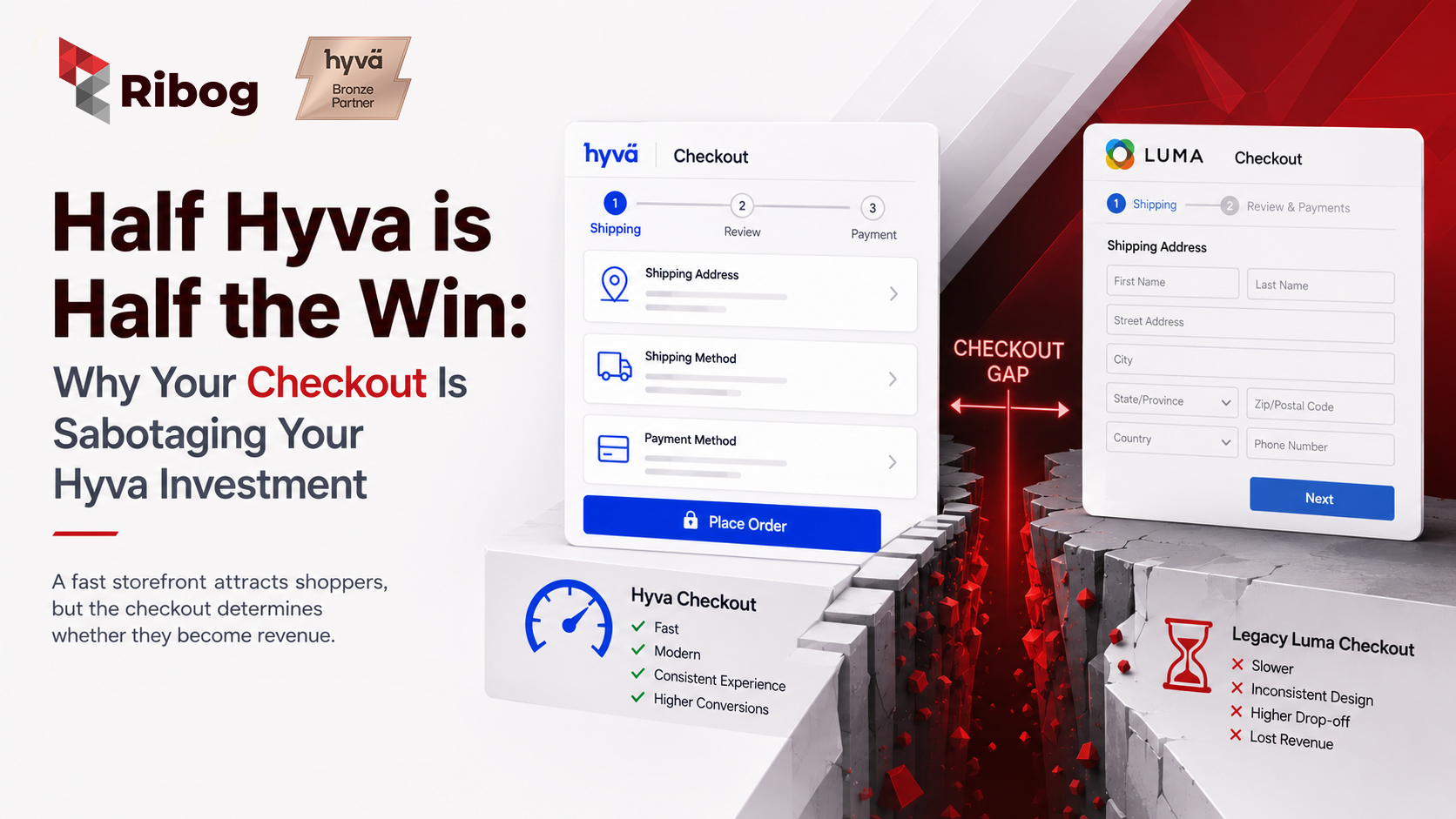
Suddenly, the experience changes. The page takes longer to load. The design feels disconnected. Form fields behave differently, and the checkout looks as though it was borrowed from a Magento store built in 2016.
That is not a small visual issue. It is a commercial problem.
You invested in speed, usability and modern frontend performance—but stopped at the exact point where visitors become customers. It is like rebuilding a high-performance sports car and leaving the old engine in place for the final mile.
This article explains why combining a Hyva Theme Magento storefront with a legacy Luma-based checkout creates a costly “checkout gap,” and what a complete Hyva Checkout implementation can unlock.
Takeaway: A fast storefront attracts shoppers, but the checkout determines whether they become revenue.
Hyva Theme is a modern frontend approach for Magento 2 and Adobe Commerce. It replaces much of the complexity associated with Luma using a lighter stack built around Alpine.js and Tailwind CSS.
Instead of making the browser process numerous legacy frontend dependencies, Hyva focuses on leaner code, faster rendering and simpler customization. For merchants, that can mean smoother shopping, stronger mobile usability and better opportunities to improve Core Web Vitals on public storefront pages.
Hyva is therefore more than a visual theme. It is an architectural decision intended to reduce frontend weight. But a Magento Hyva migration is not complete when product discovery is modern and the transaction journey remains legacy.
Takeaway: Hyva modernizes the storefront, but its full value appears when the buying journey stays modern through payment.
A Luma-based checkout can operate alongside a Hyva storefront through Hyva’s theme fallback system. Technically, the store works.
Commercially, “it works” is a dangerously low standard for the most important page on an eCommerce site.
When shoppers enter a legacy checkout, Magento may switch away from Hyva and load the traditional Luma stack. According to the official Hyva Luma fallback documentation, pages using fallback do not load Hyva’s Tailwind CSS and Alpine.js environment. Instead, the browser loads RequireJS and the standard Luma theme dependencies.
The result is a visible and technical gap between browsing and buying.
Customers may not know what theme fallback means. They do notice when a website suddenly feels different.
A shopper can move from a polished product page into a checkout with different typography, buttons, validation messages and interaction patterns. Even when the payment page is secure, that inconsistency can create hesitation.
Think of entering a luxury showroom, receiving excellent service and choosing a premium product—only to be taken to a poorly lit basement to pay. The product has not changed, but the final environment weakens confidence.
Checkout consistency is not cosmetic. Familiar patterns reassure customers that they are still dealing with the same brand and the same standard of quality.
Takeaway: When the design language changes at checkout, trust can drop exactly when the customer is asked to commit.
A legacy checkout brings back frontend weight that Hyva was designed to reduce.
Extra libraries and browser-side processing can make checkout feel slower. Shipping options may take longer to update. Validation may feel delayed. Payment components can appear after a pause. On a weaker mobile connection, every extra dependency becomes more visible.
It is like clearing every traffic light on the road to the airport and then creating a queue at the departure gate. The fast journey becomes irrelevant if the customer is delayed at the final checkpoint.
Checkout performance should be tested with real devices and actual payment and shipping integrations. Although Core Web Vitals are most visible as an SEO concern on indexable pages, the same underlying experience principles—fast loading, responsive interactions and visual stability—matter during payment.
Takeaway: Performance matters everywhere, but delay at checkout sits closest to the revenue line.
Cart abandonment is already one of eCommerce’s largest challenges. Baymard Institute’s cart and checkout research currently places the global average cart-abandonment rate at approximately 70.19%.
Not every cart can be recovered. Some shoppers are comparing prices or are not ready to buy. But checkout design and flow frequently contribute to abandonment.
Baymard’s research has also found that 18% of US shoppers have abandoned an order because the checkout process was too long or complicated.
Unclear errors, forced account creation, unexpected complexity, slow responses and confusing forms can turn purchase intent into frustration.
That is the contradiction of a half-completed Hyva implementation: the merchant invests in a faster frontend for Magento conversion rate optimization, yet leaves the highest-intent stage on the older experience.
Quick Fact: Approximately seven out of ten online shopping carts are abandoned. Checkout improvement is therefore one of the most valuable optimization opportunities for an established store.
Takeaway: More traffic cannot efficiently compensate for a checkout that loses high-intent customers.
Hyva storefronts are commonly built with responsive, mobile-first experiences in mind. The journey can feel clean on a phone—until the customer reaches a checkout designed around older assumptions.
On mobile, small problems become large ones. A confusing desktop layout becomes a long scroll. A validation error can hide above the keyboard. A payment option that loads slowly can look broken. Dense order summaries increase friction on a small screen.
Mobile users are also easy to interrupt. A notification, poor signal or moment of uncertainty may end the session.
A fast Magento checkout must therefore be more than technically functional. Address entry, shipping, payment and review should feel effortless on a small screen.
Takeaway: The mobile storefront earns attention; the mobile checkout must protect it.
Running Hyva across the storefront while maintaining Luma at checkout means supporting two frontend worlds.
Developers work with Tailwind CSS and Alpine.js on the storefront, then switch to Luma styles, Knockout components and RequireJS patterns for checkout. Design changes may need separate implementation. Testing expands. Checkout customizations become riskier, and extension upgrades can reintroduce conflicts.
Hyva’s own migration documentation explains how Luma JavaScript and templates must be converted into modern Alpine.js-based Hyva components. Similarly, Luma CSS generally needs to be converted to Tailwind CSS.
It resembles renovating a building while keeping two incompatible electrical systems behind the walls. Everything may run today, but each future change becomes slower and harder to diagnose.
Takeaway: Two frontend architectures turn ordinary checkout improvements into ongoing maintenance work.
Merchants adopt Hyva expecting faster pages, improved UX, easier development and a stronger foundation for growth.
If checkout remains legacy, only part of that investment reaches the full customer journey.
A temporary fallback is not always a mistake. During a phased migration, it can be a practical bridge while complex payment, shipping or business features receive compatibility work.
In fact, Hyva’s Luma Checkout FAQ acknowledges that some merchants may need to retain a Luma-based checkout temporarily during migration or for compatibility reasons.
The mistake is treating the bridge as the destination. When fallback remains indefinitely, checkout work is postponed and the original performance project never reaches the point closest to revenue.
Takeaway: A partial migration can be sensible temporarily, but leaving it unfinished limits Hyva ROI.
The hesitation is understandable.
Checkout connects customer accounts, addresses, shipping rules, taxes, promotions, payment gateways, fraud tools, analytics and order creation. Merchants who have experienced a failed customization are right to be cautious.
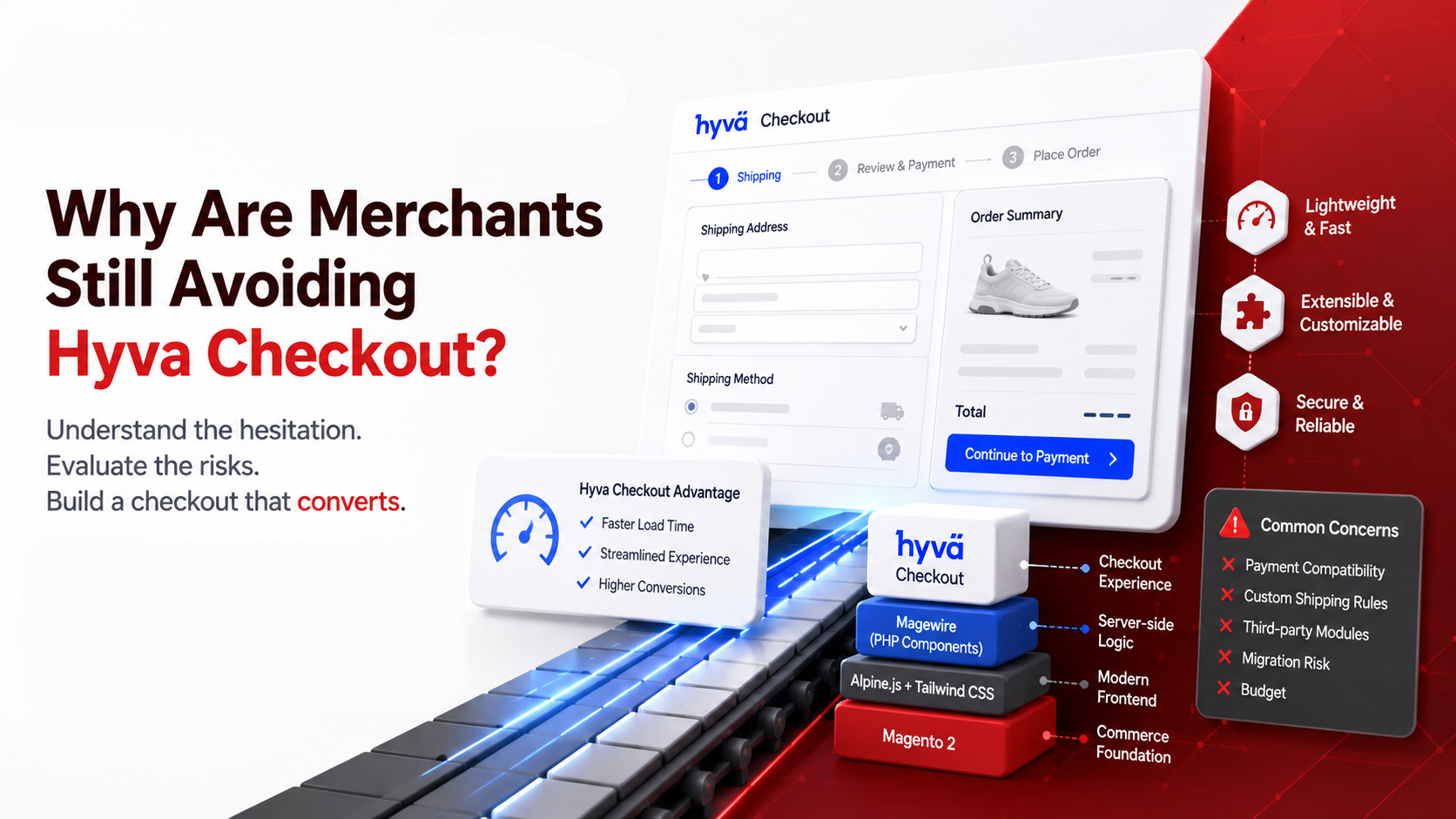
Typical concerns include payment compatibility, custom shipping rules, third-party modules, migration risk and budget. Some businesses are also unaware that Hyva Checkout is a separate commercial product. Others assume installation is merely a visual switch, when reliable implementation requires dependency mapping, customization and structured testing.
The answer is not to rush. It is to replace uncertainty with an audit.
A Magento partner should identify checkout dependencies, rank them by business importance, confirm available compatibility modules, estimate custom work and define a safe rollout plan.
Hyva maintains official integration information for:
These resources can help merchants and development teams understand what is already available and where additional implementation work may be needed.
Takeaway: Checkout caution is healthy—but it should lead to assessment, not permanent inaction.
Hyva Checkout is the native checkout solution for the Hyva ecosystem. It replaces the traditional Magento checkout with a lighter, faster and more customizable approach.
Its frontend follows Hyva principles with Alpine.js and Tailwind CSS, while Magewire moves much of the interactive logic into a PHP-driven component framework familiar to Magento developers.
For merchants, the benefit is not the technology label. It is a checkout that can match the rest of the store, respond quickly and avoid loading the full legacy Luma stack.
Hyva Checkout uses a flexible component-based structure. As explained in the Hyva Checkout Quickstart documentation, address forms, payment methods, shipping methods, navigation buttons and other components can be registered independently and positioned within the checkout flow.
That provides greater control over how checkout is structured around a merchant’s requirements.
Integrations are available for widely used payment providers, shipping methods and address tools. However, compatibility should never be assumed.
For example, Hyva’s shipping documentation explains that methods offering additional frontend features—such as maps, address finders or forms—may require a dedicated compatibility module.
Similarly, payment methods requiring customer interaction, custom forms, redirects or SDK integrations may need additional templates or compatibility work under the Hyva Checkout Payment Integration API.
Adobe Commerce and B2B feature coverage should also be checked against the store’s current requirements.
Takeaway: Hyva Checkout provides the modern foundation; successful implementation matches it to your actual integrations and workflows.
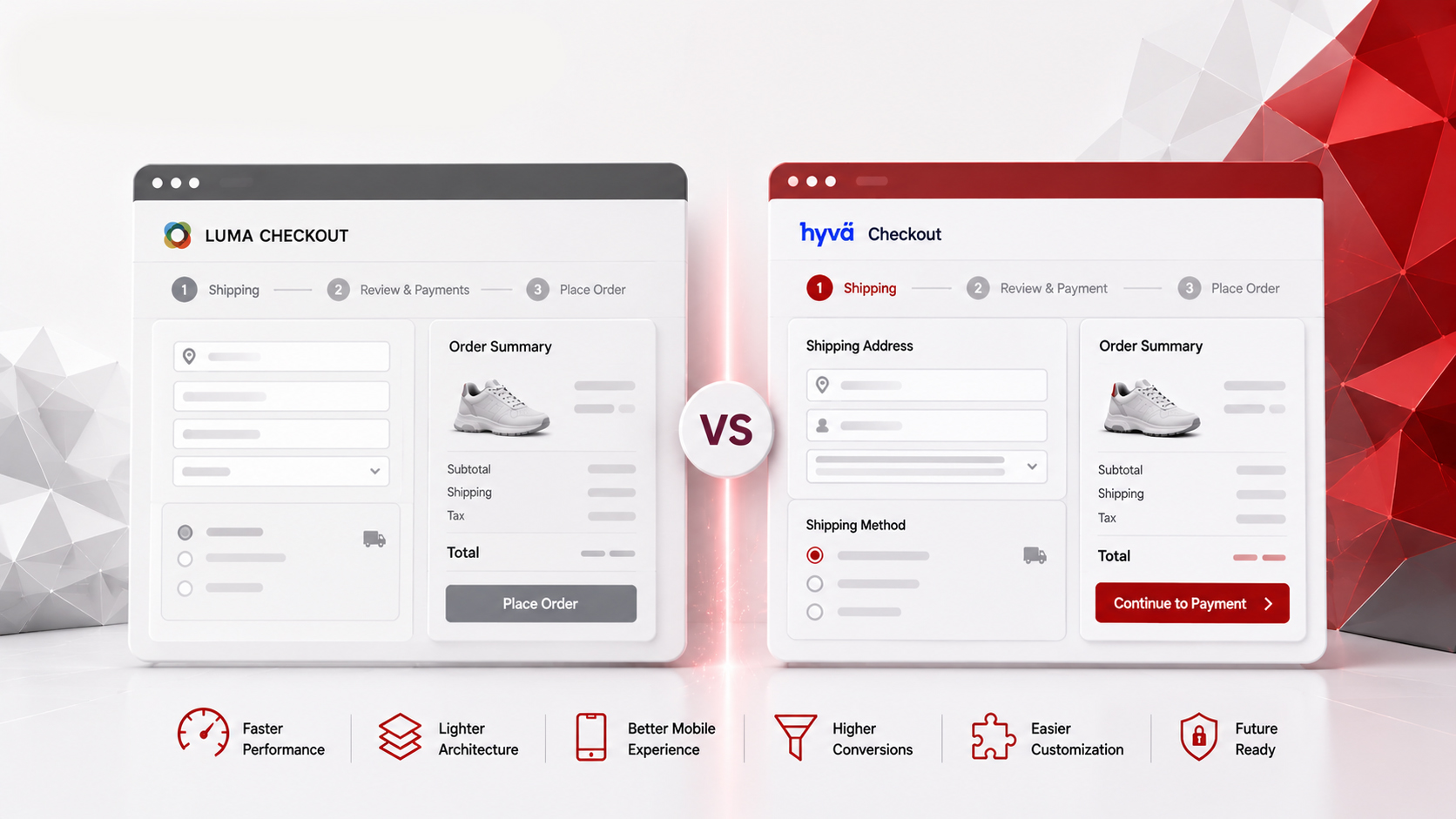
Completing the journey from Hyva storefront to Hyva Checkout creates benefits across customer experience, performance and development.
Typography, spacing, colors, buttons and form behavior can remain coherent from homepage to confirmation. Checkout becomes a continuation of the shopping experience rather than an awkward handoff.
A lighter checkout reduces unnecessary frontend overhead and allows more responsive interactions. Customers can move through address, shipping and payment with less waiting and uncertainty.
A modern checkout provides a better base for testing layout, field order, trust messaging, guest checkout, payment presentation and mobile behavior.
Teams can optimize around customer data rather than accepting a default flow.
Gradual rollout and testing can also compare the new experience with the existing checkout using meaningful evidence. Hyva’s documentation specifically discusses A/B testing Hyva Checkout against a Luma-based checkout, although a sufficiently large dataset is needed before drawing reliable conclusions.
Reducing reliance on Luma fallback lets developers work within a more consistent approach. Styling, customization, testing and future enhancements become easier to manage.
A modern architecture creates a cleaner base for new payment experiences, design improvements and changing customer expectations.
Future-ready does not mean finished forever. It means easier to evolve without dragging legacy weight into each project.
Takeaway: Full Hyva implementation joins performance, brand consistency and conversion optimization into one customer journey.

The right Hyva Checkout project begins before code changes.
Ribog specializes in Magento and Adobe Commerce development, including Hyva Theme development and customization.
The aim is not to replace checkout blindly, but to understand what it currently does, what customers need and what must be protected during migration.
Ribog can support businesses with:
A useful first step is a checkout audit. It should map the current stack, identify friction and compatibility risks, establish priorities and recommend a realistic implementation path.
That turns “Should we move to Hyva Checkout?” into a business decision based on evidence.
Takeaway: A trusted partner reduces risk by connecting technical compatibility with customer and commercial priorities.
A Hyva storefront with a legacy checkout can look like a completed transformation. Pages are faster. The interface is cleaner. Performance reports improve.
But customers do not experience your architecture as separate projects. They experience one journey.
If that journey becomes slower, older or more confusing at checkout, the unfinished part can undermine everything before it.
Hyva without Hyva Checkout is not necessarily a failed implementation. It may be a sensible first phase. But it should not become the permanent definition of success.
Every day a high-intent customer reaches a checkout that does not match the speed and quality of the storefront is another day potential conversions may be lost.
Ready to complete your Hyva journey? Talk to the Ribog team today and let’s turn your half-win into a full one.